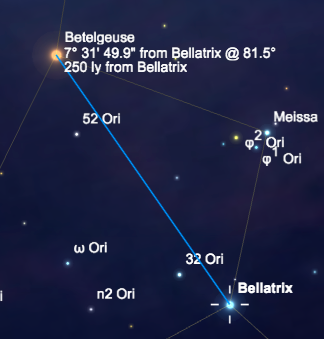
One tool that you will use often is the Measurement Tool. You select the Measurement Tool by clicking on the Hand/Measure Tool control in the toolbar. The Measurement Tool allows you to measure the angular separation, position angle, and distance between two objects.

To use it, click and hold on an object and drag the mouse to the second object. A blue line appears from the selected object to the point you dragged, showing the angular separation and position angle from the selected object to the point. You can drag the endpoint around on screen. It will "snap" to the nearest bright object (star, planet, etc) as you go by. As you pick a different "target object" this way, the readout tells you the angular separation between the two objects in degrees, minutes, and seconds of arc. Click the Cursor Selection control in the toolbar to get out of "measurement mode."
What is the approximate angular separation between the star Antares and the Moon?
- 15 degrees
- 98 degrees
- 30 degrees
- 36 degrees
What is the distance between Antares and Sabik?
- 100.0 light years
- 186.3 light years
- 469 light years
- 20.5 light years